To optimize performance for your particular hi-hat stand, run the hi-hat calibration in the "Trigger Edit" menu and then select "HH Setup".
Then follow the on-screen instructions to complete the calibration as follows.
- Loosen the hi-hat clutch so the hi-hat pad is resting on the hi-hat module.
- Press Trigger Edit, then press HH Setup at the top-right corner of the display.
- Press Set on the display, raise the hi-hat back into the playing position, and re-tighten the clutch.
- Press Finish. Follow the on-screen prompts.
To fine-tune the hi-hat performance, enter "Trigger Edit Mode", then select the HH trigger slot followed by the Advanced tab.
Then, adjust the Pedal Bottom" parameter until you are comfortable with the performance of both the open and closed hi-hat sounds.
Note that the pedal bottom parameter is a digital value representing the force needed to transition the hi-hat from Semi-Open sounds to closed. At lowest, it will require significant force which can be good for patterns where pressing the pedal for a CHK sound is necessary; but for more intricate patterns that require a sharp control over where the closed vs. semi-open patterns are, raising the pedal bottom value will help.
Troubleshooting the Hi-Hat Control
- If you are not getting a closed sound on the hi-hat pedal, the first thing you should do is check your setup-
- Make sure the HH Control cable is plugged into the control module on the stand; and on the Strata Prime that the other side is connected to the HH Control port
- Follow our video walkthrough below for the proper clutch setup. Note that as the controller is a magnetic sensor, it does require the metal washer to be at the bottom of the clutch.
- If your setup is correct, let's check the HH controller, which should be lit up and receiving power from the module if connected.
- If not lit up and on a Strata Prime Kit, let's connect one of our other TRS cables from another drum between the HH Control port to the controller.
- If not lit up and on a Strata Core/Club Kit, please reach out to support.
- If lit up, please make sure that your controller is stable to the floor and sitting flush. Most Hi-Hat stands should have a set screw below where the bottom cymbal sits(or in this case, where the controller sits) so that the hi-hat pad has a solid, even contact.
- Finally, if lit up and the controller is flush with the stand, we would want to look at your current Hi-Hat cymbal setting
- From the KIT screen, tap the Triggers icon, then tap HH on the center-right of your screen-
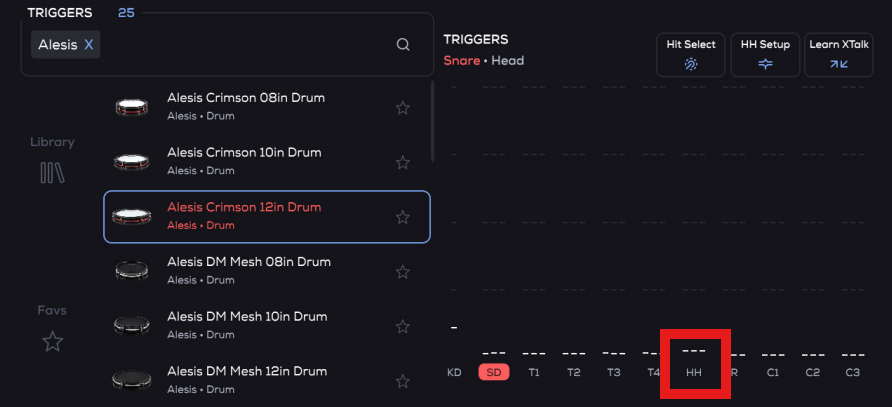
- On the presets column to your left, toggle to a different ARC Hi-Hat cymbal preset and then back to the size you have so as to reset back to the factory settings.
- Go through the HH setup once this is complete.
- From the KIT screen, tap the Triggers icon, then tap HH on the center-right of your screen-
- If you are still unable to get Open/Closed control at this point, please contact support.
Further reading:
Alesis Strata Prime Kit | Frequently Asked Questions
Was this article helpful?
That’s Great!
Thank you for your feedback
Sorry! We couldn't be helpful
Thank you for your feedback
Feedback sent
We appreciate your effort and will try to fix the article